Add your services & prices
Your services show on your booking page and fill in the length and price when you book someone.
1
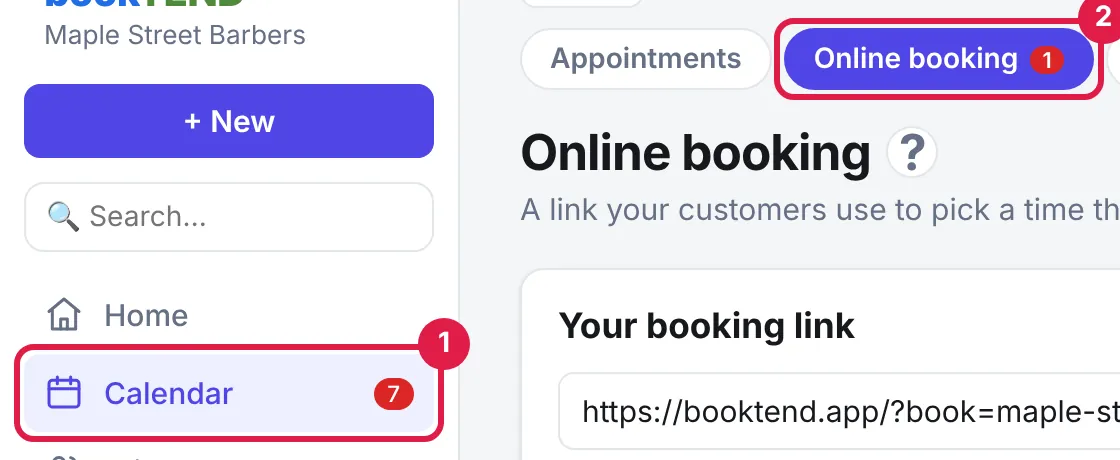
Open Online booking
Click Calendar, then the Online booking tab at the top.
2
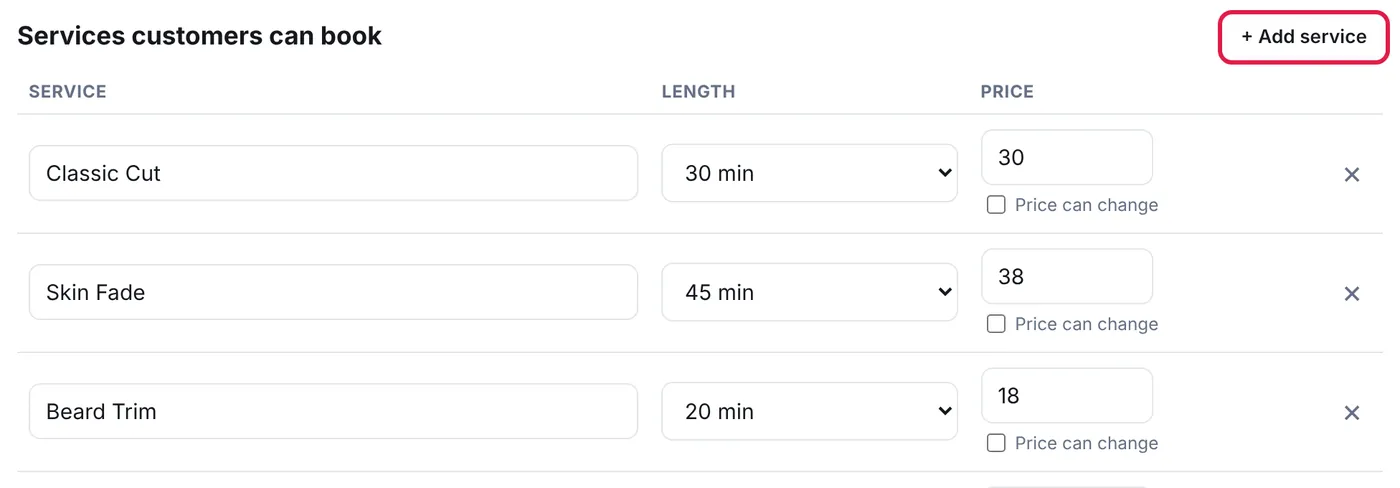
Click + Add service
It's on the Services customers can book card.
3
Type the name, pick the length, type the price
A new line shows at the bottom of the list. To change a service, just type over it. To remove one, click the ×.

4
Price depends on the job? Tick "Price can change"
Use it for work like a yard cleanup or a custom piece. Clients see "from $X (estimate)" and tick that they understand. A haircut stays a fixed price — leave it off.

5
That's it — it saves on its own
You'll see ✓ Changes save automatically at the bottom of the page.
💡 Good to know
- Further down the same page: Add-ons (like "Add color"), Questions when people book, and Video meeting links for online services.
- Want a deposit on just one service? See Take deposits.
Pictures show the demo shop "Maple Street Barbers" on a computer. On a phone, the same pages are in the bottom bar and under Menu.
Still stuck? Email support@booktend.app · All guides · Privacy · Terms